

Key Summary
- Claiming a ChatGPT business profile is free and takes about two minutes. You search for your business in OpenAI's Business Hub, confirm the listing is yours, and then either verify it or join a waitlist.
- Most UK businesses will hit a waitlist before they can verify a ChatGPT profile. OpenAI is opening access gradually. We ran the process on Tangible Digital in launch week and reached a waitlist screen rather than a verification form.
- If ChatGPT does not list your business, you can create it and verify by DNS. OpenAI issues a TXT record to add to your domain, in the same way Google Search Console verifies site ownership. That route appears to skip the queue.
- ChatGPT Business Hub reports mentions, website clicks and conversation topics. All three are aggregated, so they will show the broad shape of demand but not whether you appeared for the specific commercial prompts that bring you revenue.
- A verified ChatGPT profile will not make ChatGPT recommend you more often. Verification corrects what the assistant holds about you. Being named still comes from the authority and citation work behind AI search visibility.
What is a ChatGPT business profile?
A ChatGPT business profile is a record of your business inside ChatGPT, managed through a tool OpenAI calls Business Hub.
Once you have claimed and verified it, OpenAI says you will control a defined set of information and get reporting that has not been available before. On its own description, a claimed profile lets you:
- Keep your business details current, including name, location and contact routes
- Supply product information with pricing and availability
- Earn the blue check, which comes from passing identity verification and not from claiming alone
- See aggregated figures on how often ChatGPT mentions you and how many people click through to your site
- See the discovery topics people are raising in conversations where your website is cited
OpenAI's own walkthrough is worth two minutes: watch the introduction to Businesses in ChatGPT.
The obvious comparison is a Google Business Profile, and it is a useful one to hold in mind. Google let businesses claim a Maps listing years before most of them bothered, and the ones who moved first spent the following decade ahead of their competitors. For many of the businesses we work with, the Map Pack is now a key driver of traffic and conversions.
Why should you claim your ChatGPT business profile?
1. Can you correct what ChatGPT says about your business?
You can influence what ChatGPT says about your business through your own site, your reviews and your directory listings, but until now you could not correct anything at source.
Your website and the external sources that mention you are likely to carry on shaping what ChatGPT thinks about your business, so none of that work stops being worth doing. What a claimed profile adds is a direct line. For the first time you can tell OpenAI what is correct, rather than hoping it works it out from everything else it reads.
2. How do you see your own ChatGPT visibility data?
Every AI visibility conversation until now has been built on sampling. Agencies, our own platform included, ask assistants a set of questions on a schedule and record what comes back, because that is the only measurement available from the outside.
Business Hub is meant to report from the inside. OpenAI claims it will show how many people clicked through to your website from a ChatGPT conversation, which is something no external tool claims to measure. Whether the figures hold up, and how they compare with what lands in your analytics, is something nobody can tell you yet.
How to claim your ChatGPT business profile
Who can claim a ChatGPT business profile?
Two kinds of people, and the split will be familiar if you have ever set up Google Search Console.
- The business itself. Whoever owns or runs it, acting for the company.
- An authorised representative. Someone acting on the business's behalf, which includes an agency or marketing partner claiming for a client.
OpenAI requires you to verify your connection to the business either way, and it approves claims rather than granting them automatically. The panel says as much before you go any further, warning that you will need to verify you are authorised to represent the business.
You do not need a ChatGPT Ads account and you do not need an enterprise agreement.
OpenAI handles agency access the sensible way. The admin who claimed the business can add teammates in Business Hub and grant an agency access to manage the business or its agent, with everybody using their own ChatGPT account.
Which makes the rule here the same one that applies to Search Console, Google Business Profile and your analytics. The business claims it, and the agency is granted access. Not the other way round. Agencies change. Profiles should not have to be reclaimed when they do.
What do you need before you claim your profile?
Sort four things out before anybody logs in. Getting these wrong is tedious to unpick later.
- Decide who owns the account. One named person on a company email address, with the login stored wherever your business keeps credentials. Not a marketing manager's personal account, and not your agency's. The waitlist email goes to whichever address you sign up with, so make it one somebody checks.
- Gather your facts. Legal name, trading name, registered address, every site address, phone numbers, opening hours, the services you want named, current prices.
- Check those facts against your own website first. If your profile and your site disagree, you have handed a model two versions of the truth and no way of choosing between them. Consistency is the mechanism here, not a nicety.
- Agree who is claiming it. If an agency is doing this for you, the account still sits with the business and the agency gets access to it.
How do you find your business in ChatGPT?
Here is the flow as it stands for a UK business today. We ran it on Tangible Digital.
1. Open Business Hub and search for your business. You land on a page headed "Reach new customers and grow your business with ChatGPT" with a single search box. Type your business name.
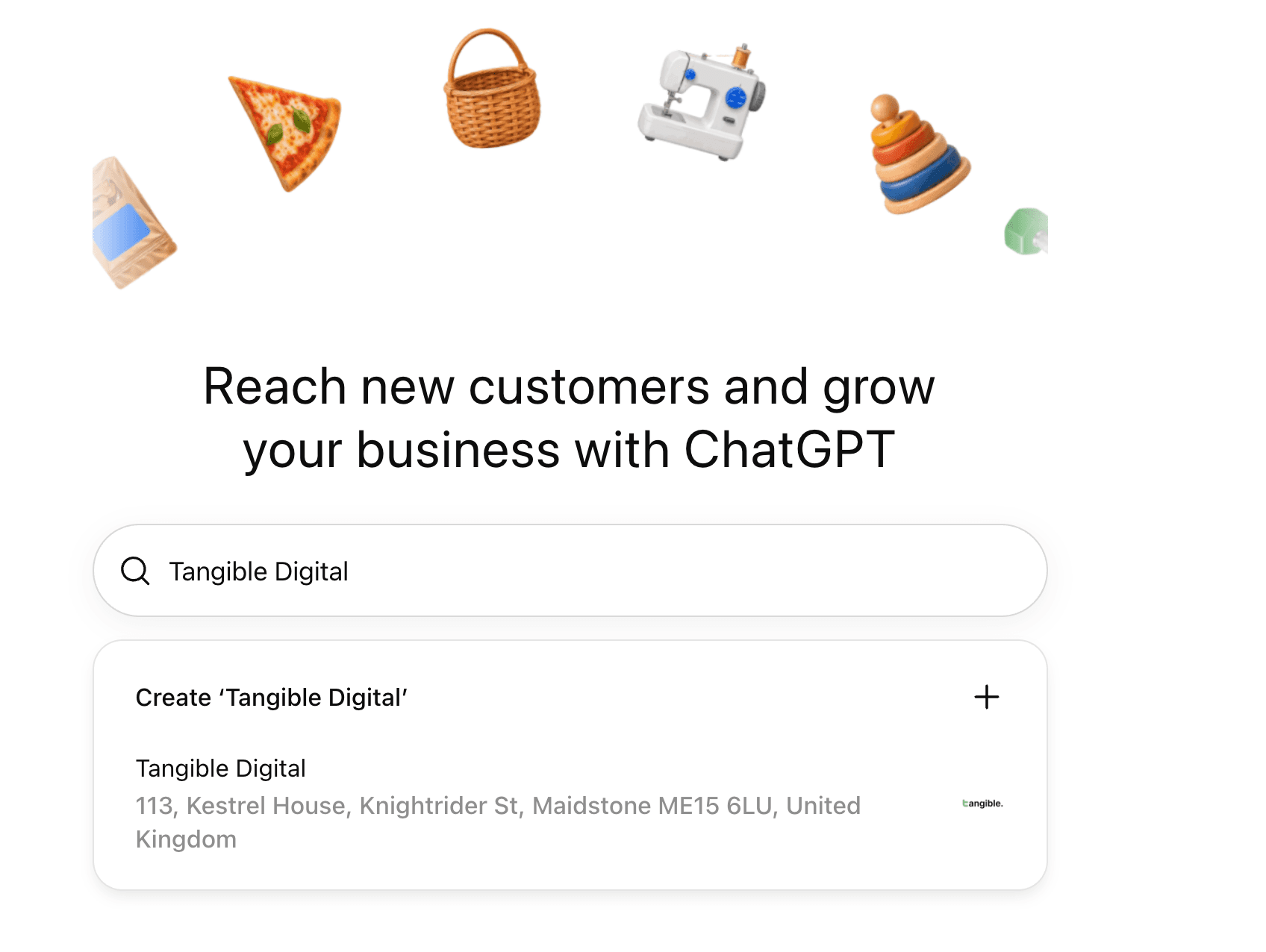
2. Pick the listing that matches your address. If several near-matches appear, choose carefully, because a claim against the wrong record is work you will repeat.
3. Read what claiming gives you. A panel appears headed "Claim [your business] in ChatGPT", setting out three things: seeing how often you are mentioned in conversations, keeping your products and business information current, and letting a business agent answer customer questions using information you supply. It also warns you will need to verify you are authorised to represent the business.
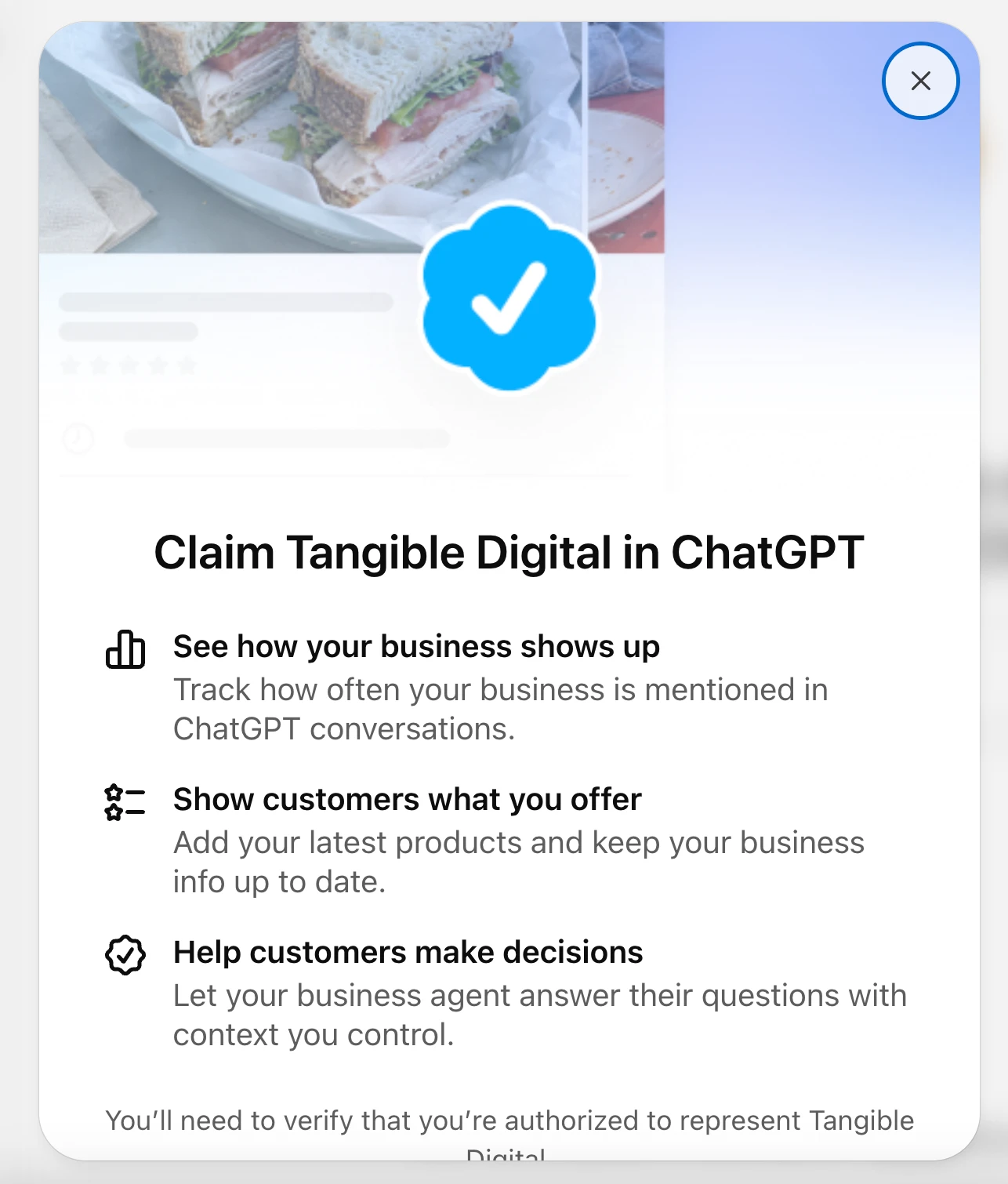
4. Join the waitlist. This is where most UK businesses will stop for now. Rather than a verification form, you get a screen headed "Join the waitlist to claim [your business]", explaining that OpenAI is opening access gradually. Your email is pre-filled from your ChatGPT account.
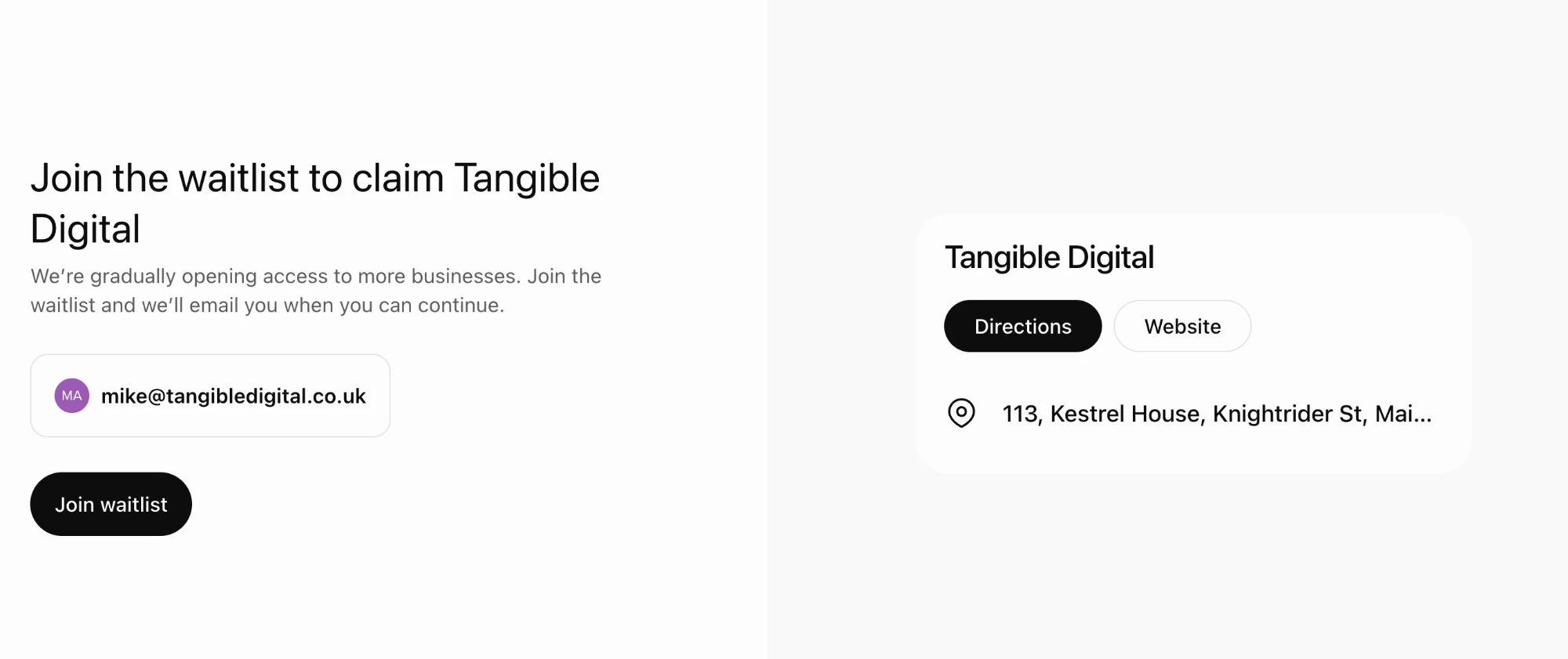
5. Confirm and wait. You get a confirmation screen saying OpenAI will email you when you can continue claiming the business.
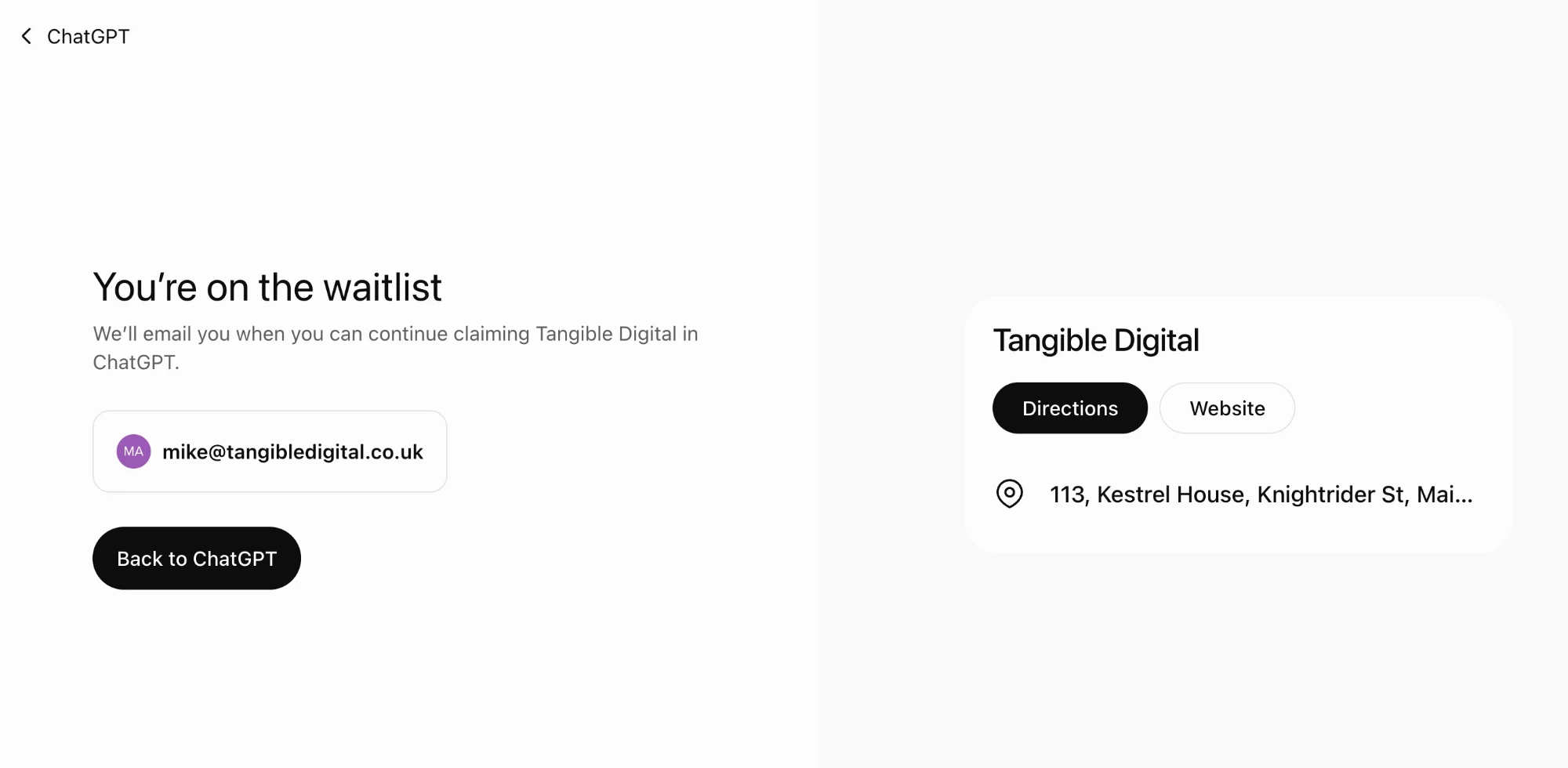
Two minutes, no cost, no ads account and no enterprise agreement required.
What if ChatGPT does not recognise your business?
If your business is not in the dropdown, use the "Create" option at the top of the search results and add it yourself. OpenAI says the option to add a business appears for eligible online businesses, while local stores and restaurants can currently only claim an existing US listing.
Some businesses taking this route are offered domain verification instead of the waitlist. ChatGPT gives you a TXT record to add to your DNS, headed "Verify that you control [your domain]", with three values to copy:
- Type. TXT
- Name or host. openai-business-profile.yourdomain.com
- Value or content. openai-business-profile= followed by a long unique string
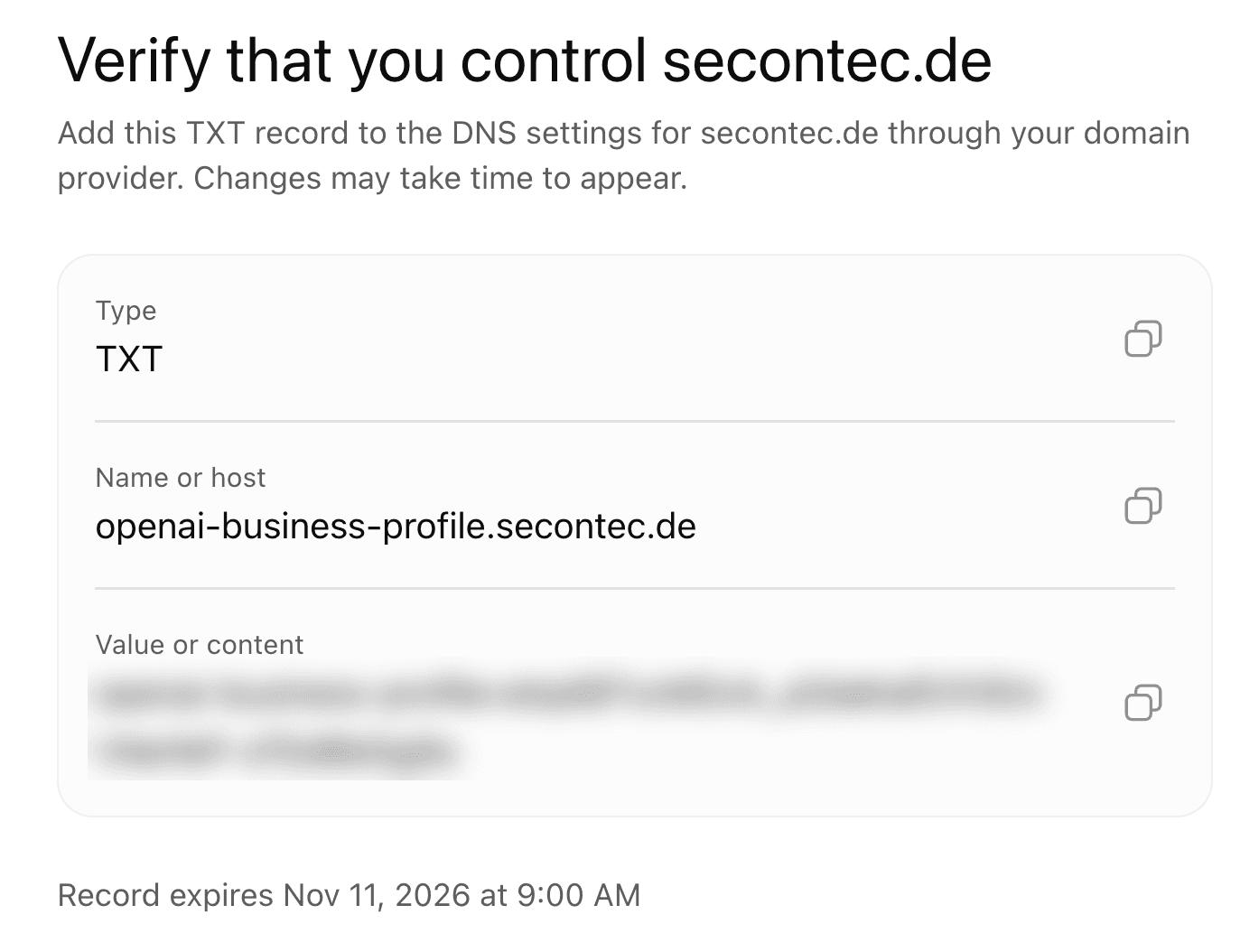
Three things to know before you start.
- The record carries an expiry. ChatGPT shows an expiry date and time on the screen. Add the record the same day you generate it, or you will be back for a fresh one.
- DNS changes take time to appear. Usually minutes, sometimes hours, depending on your provider and your TTL.
- Get the right person on it. If your developer, host or IT provider controls your DNS rather than you, send them the three values and the expiry together. Asking in stages is how the record runs out.
If you have ever verified a domain for Google Search Console, this is the same job with a different string.
What happens after you get off the waitlist?
OpenAI's documentation sets out what should follow once access opens. Expect to:
- Verify your connection to the business. OpenAI lists phone, business email, website domain and Shopify as methods, depending on the business.
- Pass identity verification with Persona. This is a second step and it catches people out. Claiming on its own does not give you the blue check, and it does not unlock the insights either. Until Persona approves you, you cannot publish changes, connect a product feed, view the reporting or build an agent. Expect to need photo ID, business registration details and proof you are authorised to act for the business.
- Complete every field. Details, locations, contact routes, services. Write them exactly as they appear on your website, down to the punctuation of your business name.
- Add product information if it applies, with current pricing and availability, and put a recurring task in the diary to keep it accurate. A price that has drifted is worse than no price at all.
- Grant access deliberately. Work out who needs it and at what level before you start inviting people in. The discipline is the same one we set out for adding someone to a Google Business Profile, and the reasoning carries across exactly.
- Write down who owns it. Who holds the account, who has access, when it was last checked. Profiles that nobody owns are profiles that go stale.
How do you claim ChatGPT profiles for multiple locations?
It looks as though every location ChatGPT recognises has to be claimed separately. Type your brand name into Business Hub and you get a list of the locations it holds for you, each one its own listing.
OpenAI confirms this in its own documentation. Each distinct brand is managed separately, claiming the main brand does not claim its locations, and central management across a parent company's brands and locations is not currently available. For brands going through a managed claim, individual location profiles stay locked by default.
We are claiming one location for now and waiting until the waitlist clears before doing the rest.
While you wait, there are four things worth settling.
- Search your brand name and write down every location that comes back, because that list is what ChatGPT currently thinks you are
- Claim one and see what a verified record looks like before you commit the others
- Decide who maintains each record, and whether local managers get access or whether it stays central
- Make sure the details on each record match the corresponding location page on your website, not head office
If that sounds familiar, it is the same governance problem that multiplies across every platform you appear on, which is the whole argument behind the way we approach multi-location SEO. Solve it once, in writing, and apply it to each new platform as it arrives.
What does the new ChatGPT Business Hub report on?
Which ChatGPT metrics does Business Hub show?
OpenAI describes three:
- Mentions. Not what you would assume. For an online business, a mention counts only when ChatGPT references your website. Naming your brand on its own does not count.
- Website clicks. How often people click through to your site.
- Discovery topics. Common themes in the answers that mentioned or cited you. OpenAI is explicit that these do not reveal individual prompts and do not measure customer intent.
Insights cover a rolling 28 days, and there are two limits worth knowing before you read anything into them. Figures only appear once there are enough conversations to pass a reporting threshold, and OpenAI says counts may be incomplete. A blank metric does not mean nothing happened.
The mentions definition is the one to watch. If ChatGPT recommends you by name but does not cite your website, that recommendation does not appear in your mentions figure at all. Anybody reporting Business Hub mentions as share of voice will be understating it.
Does OpenAI share customer conversations with businesses?
No. OpenAI states that businesses do not receive users' conversations, or the chats held with a Business Agent. What you get is aggregated.
That is the right call. It also sets a hard limit on what the tool can answer.
Why do you still need your own AI search tracking?
You still need your own AI search tracking because aggregated topics are not the same as prompts, and prompts are where the money is.
Business Hub may tell you that "pricing" or "delivery times" came up often. It will not tell you whether you appeared when somebody asked "best private hair transplant clinic in Manchester", or whether your competitor did instead. Those specific, commercial questions decide whether you get the enquiry, and a topic summary flattens them into nothing.
So run both:
- Business Hub for the inside numbers, which are clicks and the broad shape of demand
- Your own prompt tracking for the named questions that matter commercially, asked on a schedule, recorded verbatim, with your competitors' mentions alongside yours
That second one is work you were already doing if you take AI search seriously, and nothing announced this week replaces it. A platform reporting on itself will tell you how visible you are in general. It will not tell you whether you are winning the twenty questions your sales pipeline depends on.
What is a ChatGPT Business Agent?
Once a profile is claimed, OpenAI says eligible businesses can build, test and publish an agent that answers customer questions using information they supply. It sits on the profile, and customers can choose to talk to it about products and policies.
It cannot transact. An agent explains products and policies and links to your website, where the customer completes the purchase, the booking or the order enquiry. Worth knowing before anybody in your business describes it as a sales channel.
For now it is limited to eligible ecommerce and online service businesses in the United States. OpenAI has said it intends to widen both the markets and the categories, which puts it some way behind the waitlist for UK firms.
Can you advertise through a ChatGPT Business Agent?
Yes. A Business Agent can be sponsored and used as a destination for ChatGPT Ads. Sponsored placements are labelled and kept separate from ChatGPT's own replies.
OpenAI's advertising business passed a billion dollars in annual run rate in August. Business Agents are an advertising format with a service layer attached, and they should be budgeted as one.
What should you do about Business Agents right now?
- Get on the waitlist for the profile. It is free, it takes two minutes, and the profile is the gate everything else sits behind.
- Leave agents alone until they reach the UK, then treat them as a paid channel with a budget, a test and a measurable outcome. Do not file them under visibility and expect them to behave like earned coverage.
- Keep your product data clean in the meantime. An agent is only as good as the feed behind it, and the businesses with tidy product information will be the ones who can switch it on in a week rather than a quarter.
Will claiming your ChatGPT profile improve your rankings?
There is no evidence that it will, and OpenAI has not suggested it does.
OpenAI answers this one itself. Claiming lets you manage the information you provide about your business. It does not guarantee increased visibility and it does not give you direct control over ChatGPT's independent recommendations. Advertising does not influence those answers either.
A verified profile should make you correct when you are named. There is no reason to think it makes you named.
Being named comes from the same work it came from last month:
- Being the source an assistant trusts on your subject
- Saying the same things about yourself everywhere you appear
- Being cited by the places assistants read, which for most sectors means review platforms, trade bodies, directories and video
- Having pages that answer the question somebody asked, rather than describing your services
- Carrying the credibility signals that hold up under scrutiny, which is the whole argument of our EEAT checklist
We set that out properly in how to rank your local business locations in ChatGPT, and none of it changes because a dashboard is on its way. If anything, a dashboard makes the gap between being accurate and being recommended easier to see.
How do you measure AI search visibility properly?
Whatever Business Hub ends up showing will be produced by OpenAI, about OpenAI's product, and aggregated by OpenAI. That is useful. It is not independent, and it covers one assistant out of several.
If a chart of AI visibility is going in front of your board, it should not be marking its own homework.
Use each source for the thing only it can do:
- Business Hub for click-throughs and discovery topics, once you have access, because nobody outside OpenAI can see those
- Independent prompt tracking for the question your board is asking, which is whether you are recommended more often than you were. That means the same named questions every month, across ChatGPT, Google AI Overviews and Gemini, recording how often you are named and how often your own pages are cited
- Search Console for what the assistants send you that lands in organic search, because the two channels are not separate in practice
Prompt tracking is the only one of the three that covers more than a single platform. A figure drawn from ChatGPT alone will tell you a comforting story in the month ChatGPT happens to favour you, and a different story in the month Gemini takes the question.
What should you do about this today?
Most of what has been written about this launch, including parts of this piece, rests on OpenAI's own description of a product that went live days ago and that most UK businesses cannot use yet. Treat the numbers as promised rather than proven until you have seen them for your own business.
What you can do today is find your listing and get in the queue, or verify by DNS record if your business is not listed. That is housekeeping, it is free, and it takes two minutes. Being recommended is the work, and it is the same work it was last week.
Sources
- Introducing Businesses in ChatGPT, OpenAI, 10 November 2026
- Setting up your business on ChatGPT, OpenAI Help Centre
- Businesses in ChatGPT Terms, OpenAI
- OpenAI's new Business Agents give brands a free way into the conversation, Digiday
- OpenAI lets businesses claim ChatGPT profiles and launch their own agents, The Next Web
- Businesses gain ChatGPT click and mention counts in OpenAI's Business Hub, PPC Land
- AI features and your website, Google Search Central
Ready to find out where you stand in AI search?
Tangible Digital helps multi-location businesses earn visibility in AI recommendations as well as in local search. We will show you how often the assistants name your business today, which of your pages they quote, and where your competitors are being recommended instead.
- See your mention rate across ChatGPT, AI Overviews and Gemini
- Traditional and AI search in one plan